

Can you actually buy a reliable cellular trail camera for under $100?
A few years ago, the answer often involved a long list of compromises. Today, there are far more 4G trail cameras around the $100 mark, but price alone still does not tell you whether a camera will be useful once it is strapped to a tree.
For budget buyers, the real questions are usually more practical: Does the app work reliably? Will the camera stay connected? Is the night vision usable? Is the trigger fast enough to catch an animal before it leaves the frame?
Those details matter more than a giant megapixel number printed on the product page.
The short answer: yes, you can now find a capable 4G trail camera for around $100. But the best value is not necessarily the cheapest camera. Look at the complete system: camera, cellular connection, app, night performance, power, storage, and data costs.

What Should You Expect From a 4G Trail Camera Under $100?
A $100 budget no longer means choosing between cellular access and basic trail camera features. Some cameras in this range now combine live viewing, app notifications, local storage, rechargeable batteries, solar charging, and night vision.
But budget cameras still have to make tradeoffs somewhere.
That is why comparing feature lists alone can be misleading. Two cameras might both advertise 4G, night vision, and an app, while providing very different experiences once they are deployed.
Before buying, focus on five areas:
- App and remote controls
- Cellular connection stability
- Trigger speed and detection
- Night vision quality
- Battery, solar charging, and ongoing data costs
If those five parts work together well, a sub-$100 cellular trail camera can be genuinely useful rather than simply inexpensive.
1. Do Not Judge a Cheap Cellular Trail Camera by Megapixels Alone
It is easy to compare trail cameras by looking for the biggest resolution number. But a high advertised photo resolution does not automatically mean better wildlife images.
For an actual trail camera, timing matters just as much as resolution.
A beautifully detailed image of an empty trail is not very useful if the deer already walked out of frame before the camera started recording.
Image quality depends on the sensor, processing, lighting, movement, compression, and how quickly the camera reacts after detecting motion.
For a budget trail camera, ask this first:
Can it detect the animal, start recording quickly, produce a usable image, and deliver that image to my phone reliably?
2. Trigger Speed Matters More Than You May Think
Trigger speed is the time between detecting movement and actually capturing the event.
This matters most on trails where animals are moving across the camera's field of view. A slow camera may capture the rear half of a deer, an empty frame, or nothing at all.
It matters less at a feeder or mineral site where animals tend to stay in one place for longer.
When comparing lower-cost cameras, do not assume every model reacts equally fast just because they offer similar video resolutions.
The Campark TC32 is rated with a 0.1-second trigger speed, making it suitable for monitoring moving wildlife rather than only stationary areas.
| Camera Use | Why Trigger Speed Matters |
|---|---|
| Game trail | Animals may cross the frame quickly, so faster triggering is important |
| Feeder | Animals usually remain longer, so trigger speed is less critical |
| Gate or driveway | Fast triggering helps capture vehicles or people entering the area |
| Backyard wildlife | Fast response improves your chance of catching smaller, quicker animals |
3. A Cheap Camera With a Bad App Is Not Really a Good Deal
The app is one of the most overlooked parts of a cellular trail camera.
With a traditional trail camera, you interact directly with the camera and SD card. With a cellular model, much of your everyday experience happens through your phone.
You may use the app to:
- Receive motion alerts
- Watch a live stream
- Review or download footage
- Change camera settings remotely
- Check battery status
- Control viewing direction on PTZ models
- Manage storage and cellular data
If the app is confusing, unreliable, or constantly losing communication with the camera, even excellent camera hardware becomes frustrating.
This is especially important when the camera is installed far from home. The entire reason to buy cellular is to avoid unnecessary trips to the site.
What Does the TC32 App Let You Control?
The Campark TC32 uses the CloudEye365 app on Android and iOS.
From the app, you can remotely watch the 2.5K live stream, rotate the camera, switch night vision modes, use two-way audio, download footage, manage the data plan, and access camera controls without standing beside the unit.
This makes the TC32 slightly different from many traditional cellular trail cameras. Instead of only receiving transmitted snapshots, you can actively look around the monitored area.
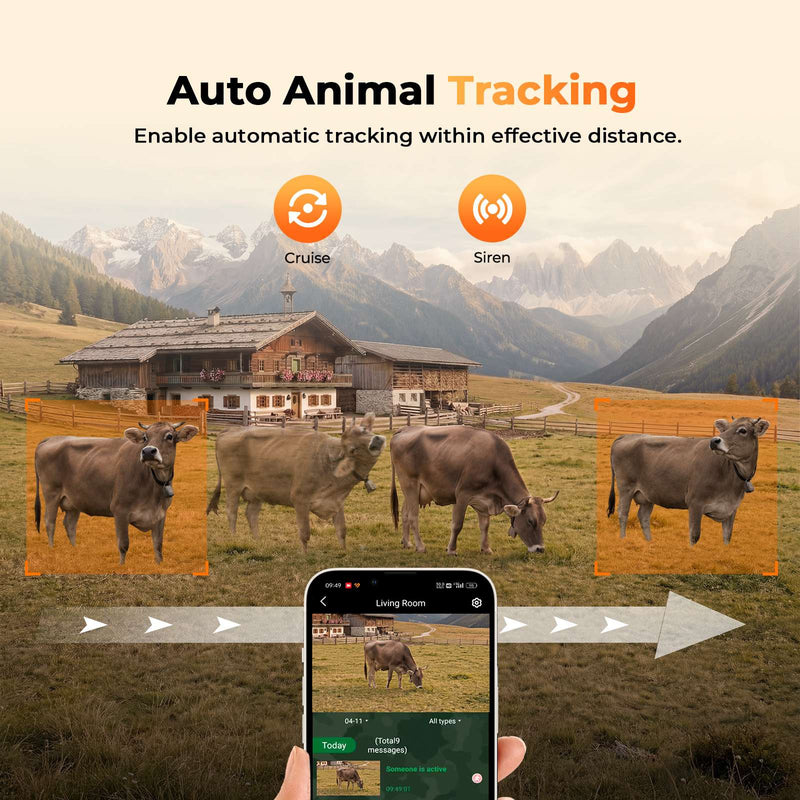
The TC32 can rotate through the surrounding area and supports automatic tracking, which makes it useful not only for a narrow game trail but also for fields, farms, cabins, backyards, and property monitoring.
You can see the full specifications on the Campark TC32 product page.
4. How Reliable Is the Cellular Connection on a $100 Camera?
This is one of the hardest things to judge from a specification sheet.
A camera can have excellent optics and a fast trigger, but if it cannot maintain a usable cellular connection at your installation site, remote features will suffer.
Cellular reliability depends on two things: the camera's network support and the signal available where you actually mount it.
The TC32 uses a built-in 4G SIM and supports major U.S. networks including AT&T, Verizon, and T-Mobile. It does not require a nearby Wi-Fi network.
Important: no cellular trail camera can create coverage where there is none. Before judging a camera's connection quality, check whether the actual tree, field, cabin, or gate has usable cellular service.
A location with marginal signal may produce slower uploads, delayed alerts, more reconnect attempts, and higher power consumption than a location with strong coverage.
Should You Test the Camera Before Taking It Into the Woods?
Definitely.
One of the easiest ways to avoid frustration is to activate and test a new cellular trail camera at home before driving it to a remote property.
Walk in front of the camera several times. Check how quickly notifications arrive. Open live view. Test night mode. Review the recorded files. Restart the camera and make sure it reconnects.
Then install it at the real location and repeat the test before leaving.
A fifteen-minute setup test is much easier than a two-hour round trip because something was never configured correctly.
5. What Should You Expect From Night Vision Under $100?
Night vision is another area where feature lists can hide important differences.
There are two different goals a trail camera may try to achieve at night:
Stay discreet, or show more detail and color.
Infrared night vision is useful when you want to observe wildlife without shining a bright visible light into the area. The resulting footage is generally black and white.
White-light night vision can produce color footage and make identification easier, but the visible illumination may be noticed by animals or people.
The TC32 gives you both options.
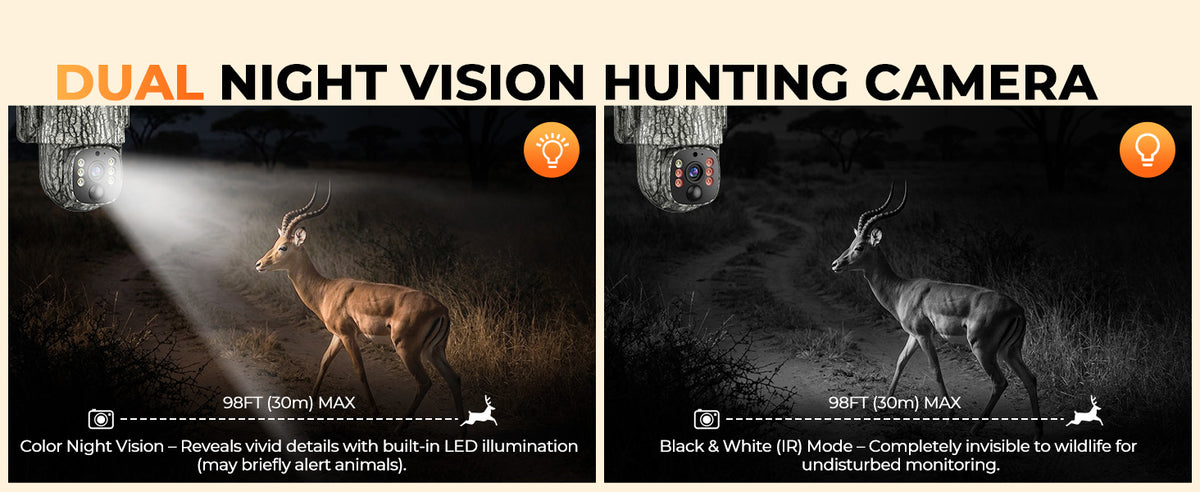
Its 850nm infrared mode records black-and-white footage for more discreet monitoring, while the built-in white LEDs provide color night viewing when identifying detail is more important.
You can switch between the two modes remotely in the app.
What Makes Cheap Night Vision Look Bad?
Poor nighttime footage is not always caused by low resolution.
A number of factors can reduce useful detail:
- Too little infrared illumination
- An animal moving too quickly through the frame
- Overexposure when a subject is very close to the camera
- Heavy digital compression
- Rain, fog, branches, or insects reflecting infrared light
- Poor camera placement
When comparing budget cameras, look at actual night examples rather than relying only on the resolution number.
6. Does a $100 Cellular Trail Camera Need Solar?
Not every trail camera needs solar, but it becomes much more valuable once cellular features are involved.
A cellular camera has more work to do than a basic SD-card camera. It has to detect motion, record, communicate with the mobile network, send alerts, and potentially provide live video.
If the camera is installed somewhere you visit regularly, manually charging or changing batteries may not be a major problem.
If it is an hour away on hunting property, that calculation changes quickly.
The TC32 combines a 7,800mAh rechargeable battery with a 3W solar panel. The solar panel helps replace the power used during normal operation and reduces the need for routine charging visits.
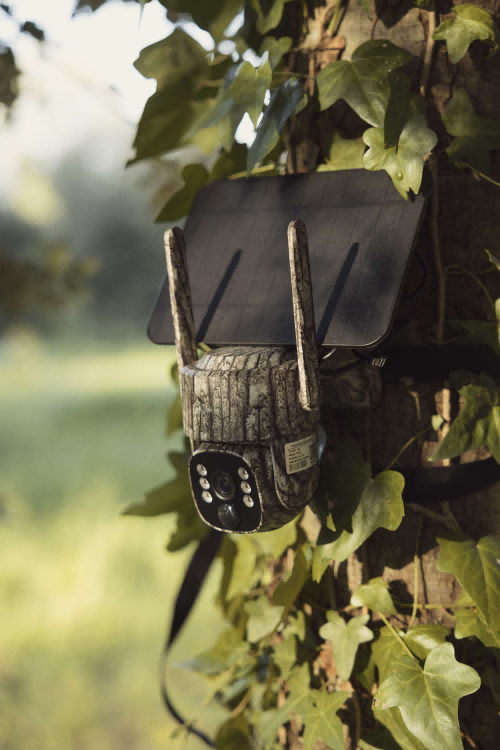
Solar performance still depends on sunlight, camera activity, temperature, and installation conditions, so it should not be treated as unlimited power in every location.
7. Watch the Data Plan, Not Just the Camera Price
A $99 cellular trail camera does not necessarily mean your total cost stops at $99.
Cellular transmission requires mobile data. That means data pricing should be part of the buying decision from the beginning.
The TC32 comes with a built-in SIM and currently includes 100MB of free data for the first month. Additional data can be recharged through the app, and an optional unlimited plan is available.
There is no need to add the camera as another phone on your personal AT&T, Verizon, or T-Mobile account.
Before buying any budget cellular trail camera, calculate two prices:
1. What does the camera cost today?
2. What will it cost to use the way I want for the next year?
A slightly cheaper camera can become the more expensive choice if the data plan, batteries, accessories, or storage costs are significantly higher.
8. Local Storage Still Matters on a Cellular Camera
Cellular access does not make an SD card unnecessary.
Local storage gives you an on-site copy of recordings and provides another way to review footage when you physically visit the camera.
The TC32 supports both cloud storage and Micro SD cards up to 128GB. The SD card is not included, so remember to factor one into your setup cost if you want local recording.
This is especially useful if you later decide to reduce cellular use or rely more heavily on local storage outside hunting season.
So What Should $100 Actually Buy You?
Instead of asking for every possible specification, it helps to define what a good $100 cellular camera should actually accomplish.
| Feature | What to Look For Around $100 | Campark TC32 |
|---|---|---|
| 4G access | Remote access without nearby Wi-Fi | Built-in 4G SIM |
| Network support | Coverage options that fit your location | AT&T, Verizon & T-Mobile |
| Trigger speed | Fast enough for moving wildlife | 0.1 second |
| Night vision | Usable nighttime identification | 850nm IR + white-light color mode |
| Remote viewing | More than simply receiving a thumbnail | 2.5K live streaming |
| App control | Remote settings and footage access | CloudEye365 |
| Power | Rechargeable or solar support | 7,800mAh + 3W solar |
| Storage | Local storage in addition to remote access | Cloud + Micro SD up to 128GB |
| Weather protection | Designed for long-term outdoor installation | IP66 |
Where Does the TC32 Make Its Biggest Tradeoff?
No $100 camera should be presented as if price no longer matters.
The TC32 is aimed at users who want a lot of remote functionality for the money. Its strongest advantage is not simply image resolution. It is the combination of 4G connectivity, live viewing, solar power, app control, dual night vision, local storage, and panoramic monitoring at the $100 price point.
If your only goal is taking the highest-quality still wildlife photograph possible and you are happy to retrieve an SD card manually, a simpler non-cellular camera may give you more imaging hardware for the same budget.
If your priority is checking a distant property from your phone, the value equation changes. Connectivity and remote control become part of what you are paying for.
Who Is the TC32 Best For?
The TC32 makes the most sense for someone who wants one affordable camera to cover more than a narrow trail.
Its 360° remote control and automatic tracking make it especially useful for:
- Open fields
- Food plots
- Farm entrances
- Cabins
- Large backyards
- Property monitoring
- Wildlife areas where animals can approach from several directions
For a fixed trail where animals always pass through the same narrow corridor, you may not need panoramic movement at all.
But when one camera needs to watch a wider area, remote rotation can reduce blind spots that a fixed lens cannot see.

Can a $100 4G Trail Camera Really Be Reliable?
Yes, but reliability at this price should be judged by the complete experience rather than a single specification.
A good budget cellular camera should trigger when it is supposed to, produce usable footage day and night, stay connected when cellular coverage is available, give you practical control from the app, and avoid forcing frequent battery maintenance.
That is a much more useful definition of value than simply finding the camera with the lowest price.
Bottom line: a $100 budget is enough for a capable 4G trail camera in 2026, but shop for the system, not the spec sheet. App usability, cellular support, trigger performance, night vision, power, storage, and ongoing data costs will matter long after the checkout price is forgotten.
Frequently Asked Questions
Can I get a good cellular trail camera for under $100?
Yes. There are now cellular trail cameras around the $100 price point with remote viewing, app alerts, night vision, rechargeable batteries, and solar charging. Compare connection support, app features, trigger performance, storage, and ongoing data costs rather than price alone.
What is the most important feature on a cheap cellular trail camera?
There is no single feature, but cellular reliability and app usability are especially important. A cellular camera loses much of its value if you cannot reliably access it remotely.
Is a 0.1-second trigger speed good for a trail camera?
Yes. A 0.1-second trigger is fast enough to help capture animals moving across a trail before they leave the frame. Trigger speed is particularly important on travel corridors and entrances.
Does the Campark TC32 need Wi-Fi?
No. The TC32 uses a built-in 4G SIM and cellular service. It supports major U.S. networks including AT&T, Verizon, and T-Mobile, so a nearby Wi-Fi router is not required.
Does the Campark TC32 have night vision?
Yes. The TC32 offers 850nm infrared black-and-white night vision and a white-light mode for color nighttime viewing. The modes can be changed remotely through the app.
Does the TC32 include a solar panel?
Yes. The TC32 combines a 7,800mAh rechargeable battery with a 3W solar panel to reduce the need for frequent manual charging.
Does the TC32 require a monthly data plan?
Cellular features require mobile data. The TC32 includes 100MB of free data for the first month, and additional data can be purchased through the app. Flexible data options, including an optional unlimited plan, are available.
Can the TC32 record to an SD card?
Yes. The TC32 supports local Micro SD storage up to 128GB as well as cloud storage. A Micro SD card is not included.
Can I watch the TC32 live from my phone?
Yes. The TC32 supports 2.5K live streaming through the CloudEye365 app, along with remote rotation, night vision controls, two-way audio, and footage access.
4G Trail Camera Features Without the Premium Price
The Campark TC32 combines 2.5K live viewing, 360° remote coverage, dual night vision, solar charging, local storage, and 4G connectivity at $99.99.
View the Campark TC32